

At a glance
- Recurring orders, rebuilt: see every order before you save
- Amazon Relay: stop retyping loads, and see what Amazon paid
- Money codes: answer drivers' requests, and choose who pays
- Driver pay plans: see what every rule pays, and test it before you publish
New features 8
Recurring orders, rebuilt: see every order before you save
Setting up a recurring order now shows, day by day, the orders it will create, and you choose whether they go straight to dispatch, wait for a dispatcher's approval or only remind you. The list says which recurring orders need a look, many can be skipped or paused at once, and an order or a lane you keep booking by hand becomes a recurring order in two clicks.
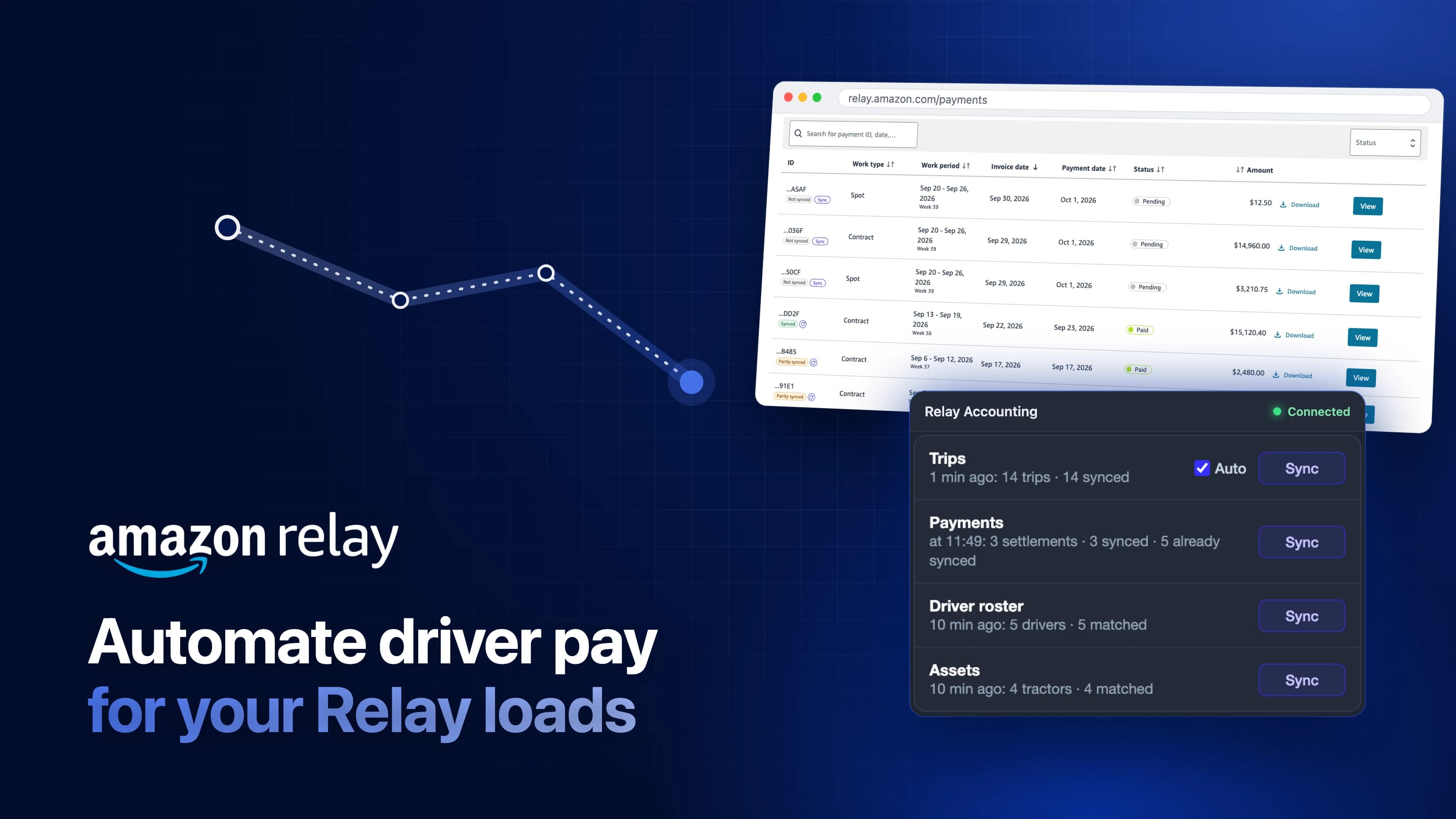
Amazon Relay: stop retyping loads, and see what Amazon paid
Haul for Amazon? Your Relay trips now arrive in the dashboard on their own, and Vektor turns them into settlements with each driver's pay worked out, so all you do is review and send. Connect it once in Settings, and the Relay Accounting extension for Chrome does the rest.
Money codes: answer drivers' requests, and choose who pays
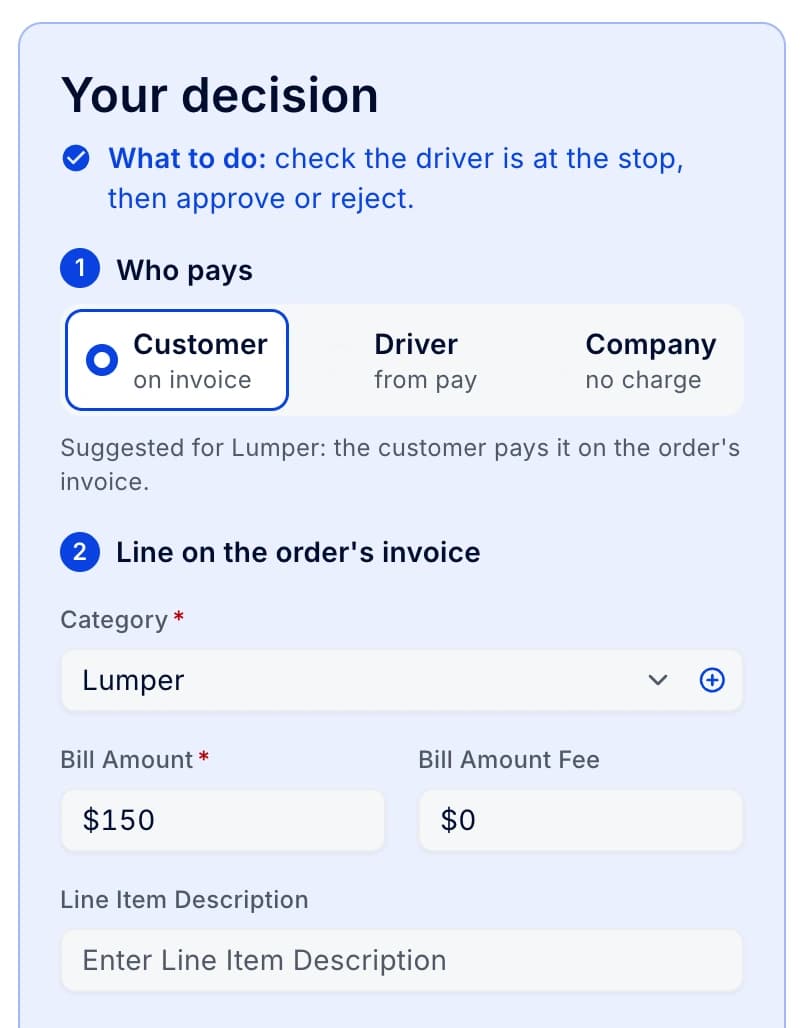
Money codes that drivers ask for from the road now land in a Requests tab, where the office approves each one and picks who pays: the customer on the order's invoice, the driver from pay, or the company.
Driver pay plans: see what every rule pays, and test it before you publish
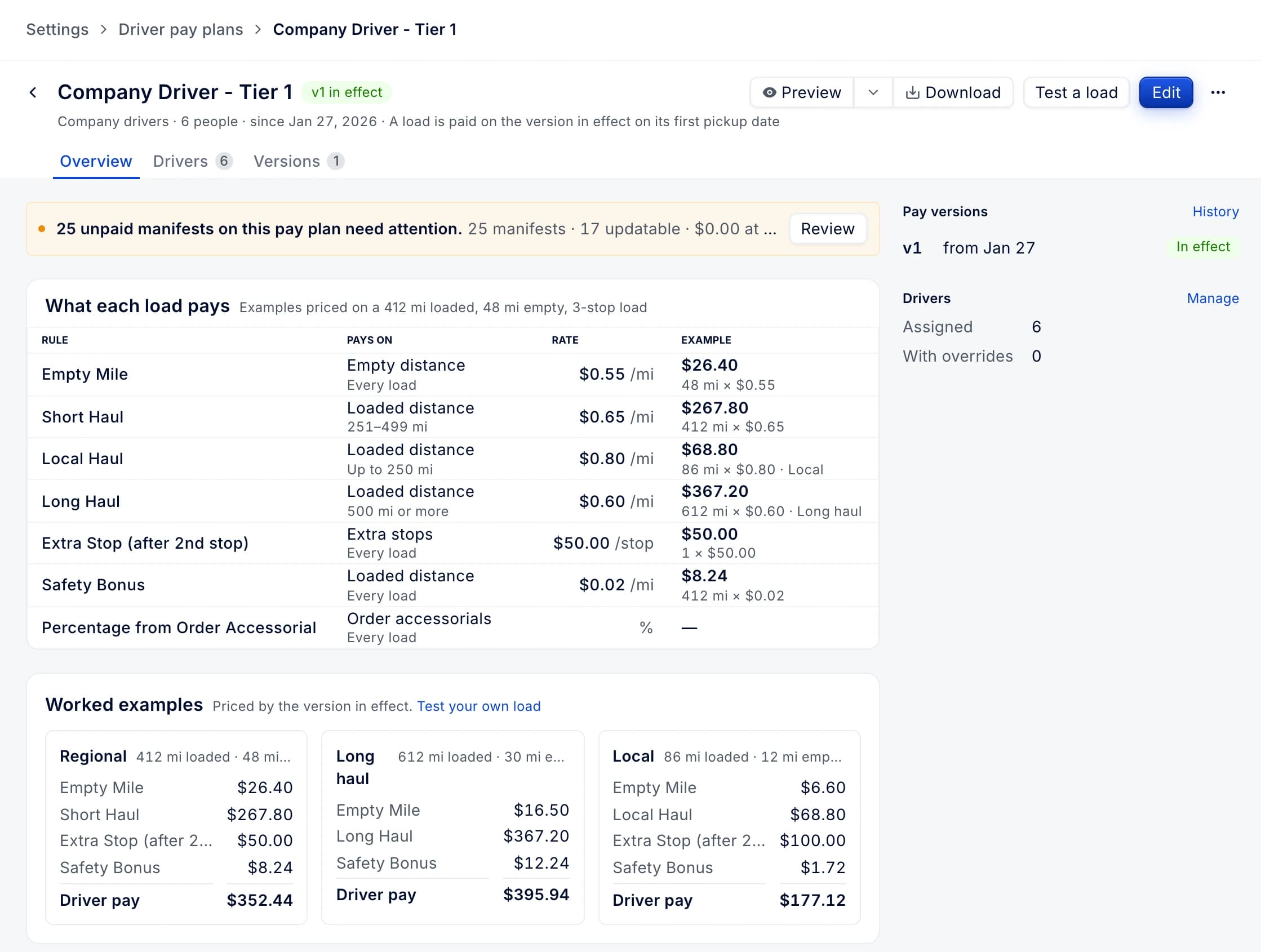
Driver pay plans now have pages of their own, with every rule priced on example loads and a calculator that prices any load or pay period with the same code that pays. Test cases run before each new version is published, and open driver pay can be brought up to date in bulk when a plan changes.
Order paperwork: checked between delivery and invoice
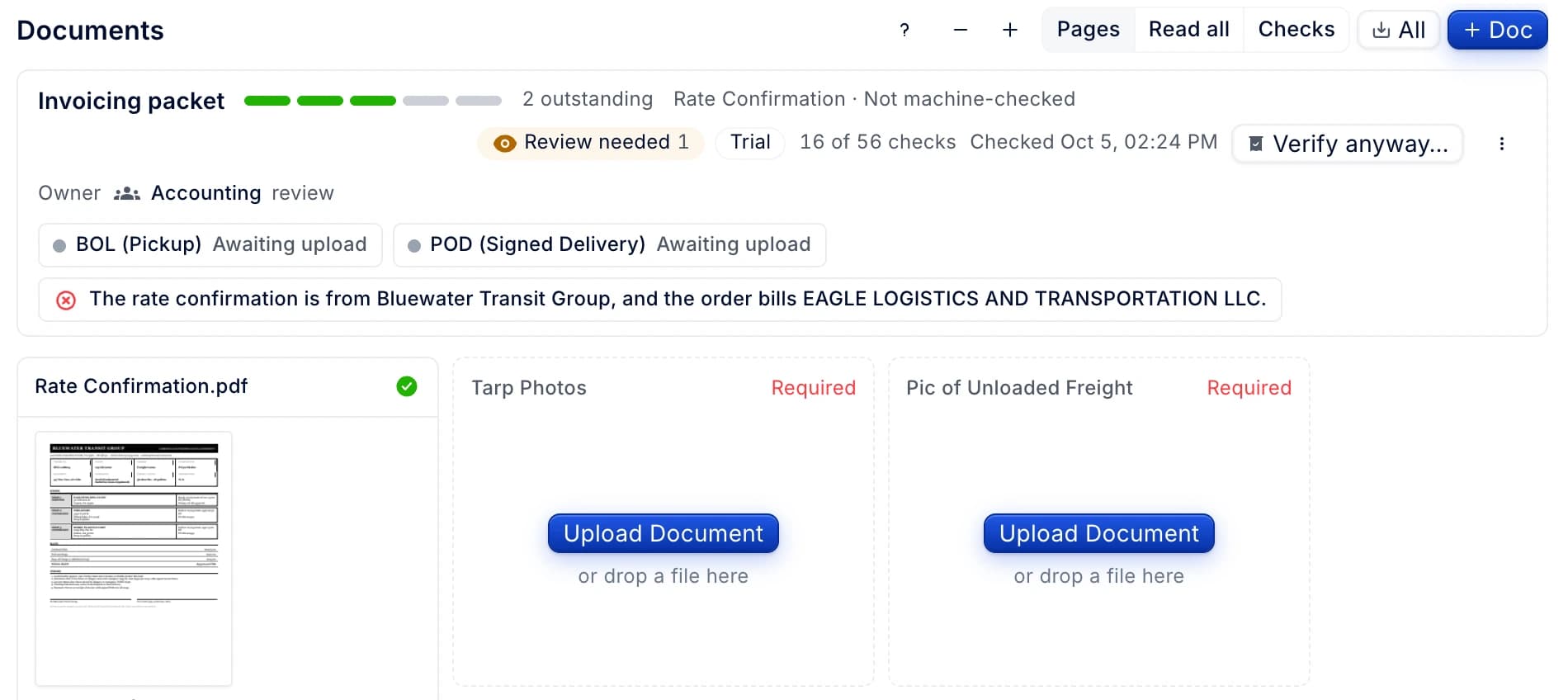
An order's Documents tab now opens with its invoicing packet: which papers are in, which are still outstanding and one action for each. After delivery the papers are checked against the order, and the packet shows what the check found and who has the next step.
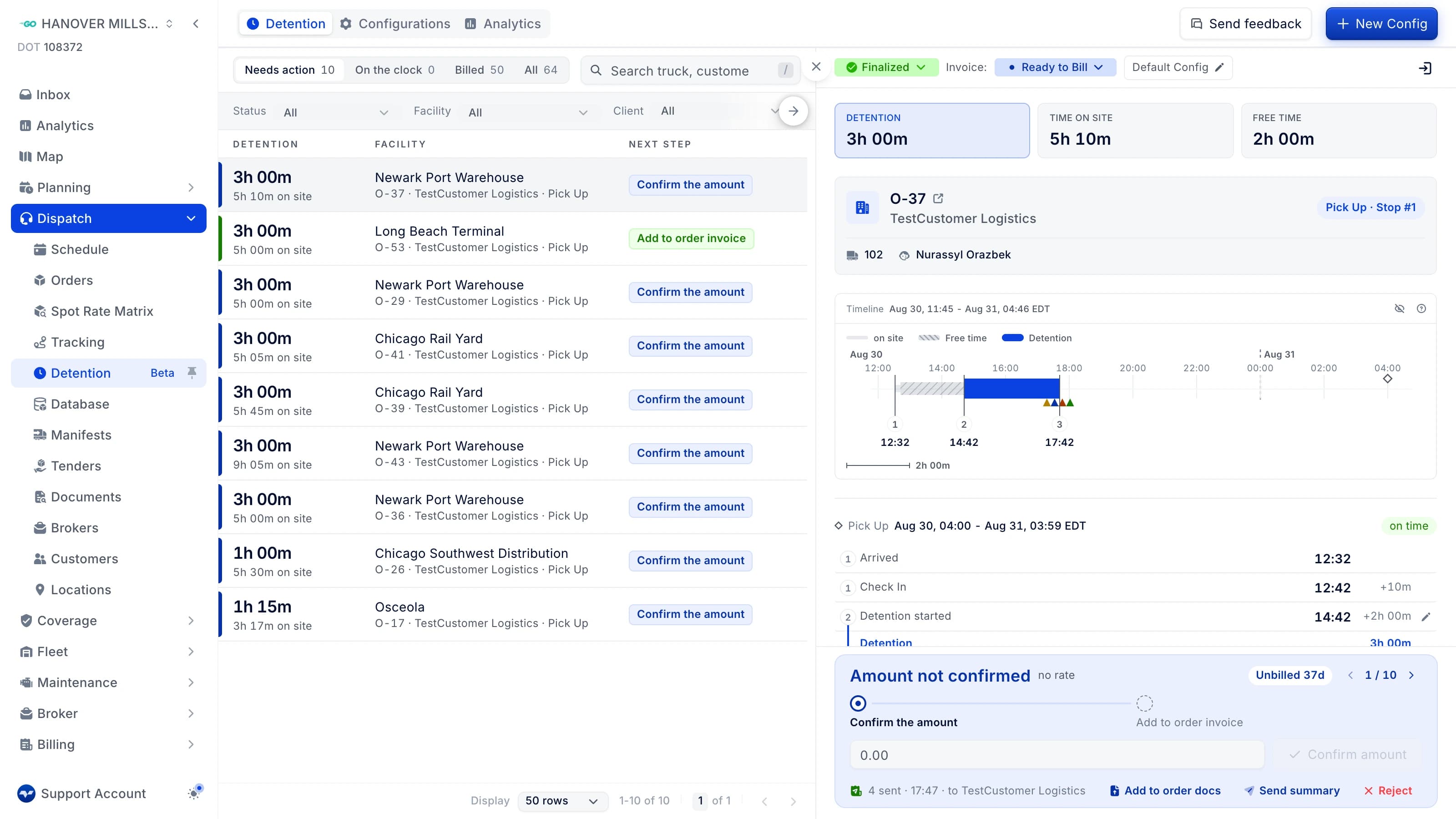
Detention: a work queue, a case console and Analytics
Detention now opens on a work queue, Needs action, On the clock, Billed and All, with the case you are on open beside the list and each step one click away. The claim report can be filed on the order's documents, and a new Analytics tab shows detentions and the amount billed by client or facility over 12 weeks or 12 months.
Carrier tenders on the board: status, carrier pay and tracking for every tendered load
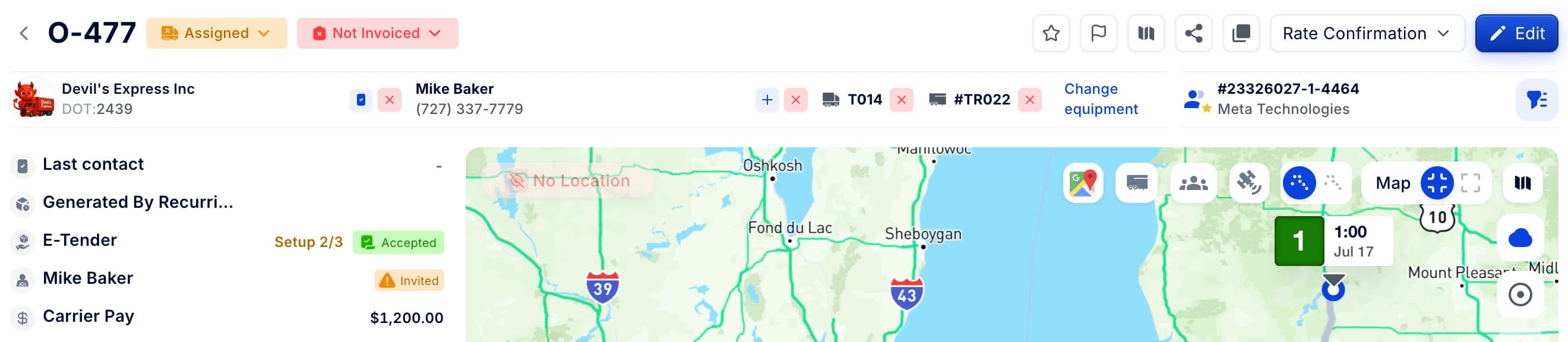
The orders and manifests boards show each load's carrier tender: its status, the time left to accept, the carrier pay and which driver, truck and trailer are tracking. Order details show what is still left to set up, and EDI tenders show how long is left to respond.
Sign-in problems now say what happened, and how to get in
When sign-in fails, the page now says what happened and offers a way in, such as getting the code by email when texts can't reach your phone. Admins can see on the Members page who can't sign in, and unlock them or email them a reset link.

Improvements 166
The order's Documents tab shows every page of every paper.
- Why we changed it
- A page opens large when clicked, and the arrow keys flip through every page of the order. Read all shows them one after another. A paper over 12 pages shows its first 11 and a "+N pages" tile, and Show less collapses it again.
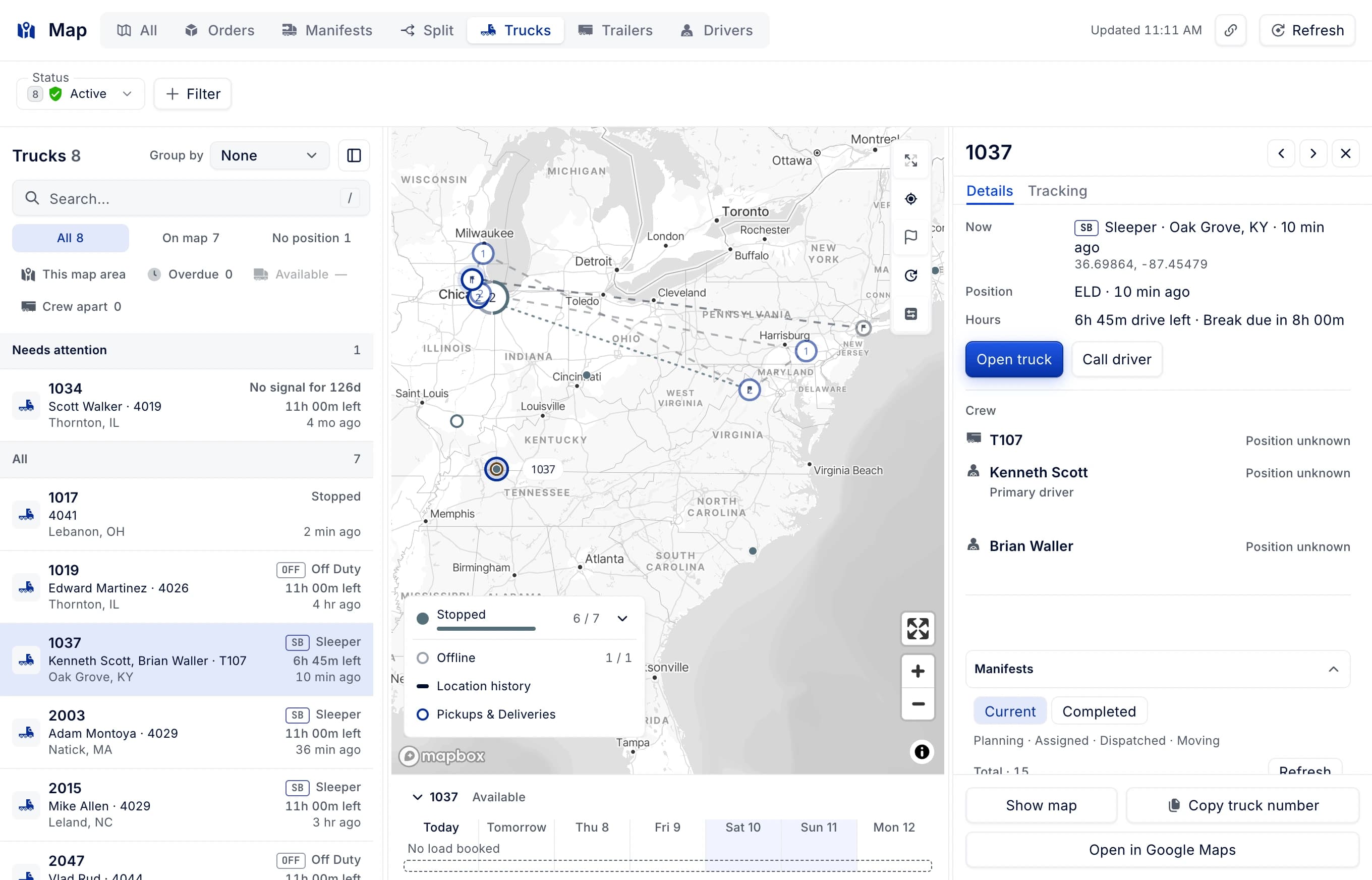
Manifests and the scheduling board now have "Open on map", which opens the fleet map on that manifest or truck.
- Why we changed it
- A linked manifest the list does not hold opens its details over the map.
Text in a scanned order document can be selected and copied
- Why we changed it
- A page with no text layer is recognised in the browser and its words are laid invisibly over the image, so the page selects, highlights and copies like any document. While recognition runs, an indicator shows in the corner of the page. Ctrl+C copies the text selected in the document viewer.
The drivers export lets you choose which driver date its date range applies to
- Why we changed it
- The date range filtered on the date a driver was added. The export dialog now has an Applies to chip with Employed During, Hire Date, Termination Date and Both, defaults to Employed During, and carries the drivers page date filter and its type into the export.
An order custom field can be marked to show in the driver app, and each hint says which other switch it needs.
A driver review on a facility's reputation tab can be reported instead of emailed about
- Why we changed it
- The tab offered "hide this review", which opened a mail client addressed to support. The card's action now opens a dialog with five reasons to pick from, an optional note and a confirmation. The review stays where it is.
Detentions is rebuilt as a work queue with Needs action, On the clock, Billed and All tabs.
- Why we changed it
- A docked case panel follows the first row, and the case console confirms the amount inline, adds it to the order invoice, rejects and walks the queue; detention and invoice statuses are editable in the case header. A new analytics page explores clients and facilities with weekly or monthly trends of detentions and agreed money.
A driver profile without a phone number is flagged, and the app invite is no longer offered for it.
- Why we changed it
- The profile shows a warning under the app-access alert, "Driver has no phone number", with "Add phone number" opening the editor. In the drivers table, the device column reads "No phone number" instead of "Invite", and clicking it opens the edit dialog.
Bill of lading templates can be managed in settings, using the document template editor
- Why we changed it
- Invoice and Dispatch navigation and configuration behaviour is unchanged, and the PDF preview no longer reloads.
Pre-trip and post-trip are always offered on the inspection type step, pre-trip first.
- Why we changed it
- A company that does not have the type clones the template with the same click, and the wizard moves straight on to Details and Review. Before, a company without them saw the "No inspection types configured" state and had to go through the catalog, preview and clone.
The tabs and the side-panel toggle on driver, truck, trailer, customer, carrier and other detail pages can be used from the keyboard.
- Why we changed it
- Tab reaches the open tab, the arrow keys move between tabs, and Enter or Space opens one.
The inspection magic-link SMS reaches the driver in the driver's own language, or the company's
A split load's manifest page can open the whole chain on the fleet map, with every leg and truck.
- Why we changed it
- The split-chain bar gets "Open on map", placed between "Show details" and "Open lineage".
When the broker name printed on a document differs from the matched broker, the order composer shows "Name differs" instead of "Verified"
- Why we changed it
- The chip's tooltip puts the paper's printed name above the matched broker's name. Nothing is blocked, and Change stays one click away.
Creating an order shows a route map of the stops being entered
- Why we changed it
- The map draws the route line through numbered pins in form order, with the active stop ringed, and shows Loaded miles. When a stop has no address it names the first one missing, with a jump to its field, or says no route found.
The order composer separates drafts nobody has opened from drafts in progress
- Why we changed it
- An unlinked draft opens on the owner tab the company usually needs.
The order composer warns when a draft's load is already an order or is open in another draft
- Why we changed it
- The banner names the order or draft it duplicates and offers View order (or Open draft), Delete draft, and Not a duplicate, with Change reference for a client-reference match. The draft's tab in the drafts strip carries a "Duplicate" chip; nothing is discarded automatically and order creation is never blocked.
What's new shows each release as one block, with its features, improvements and fixes together.
- Why we changed it
- Each block carries the version, release date, copy-link button and the release's own feedback form. Clicking a version in the left rail scrolls to its block instead of filtering the feed down to that release.
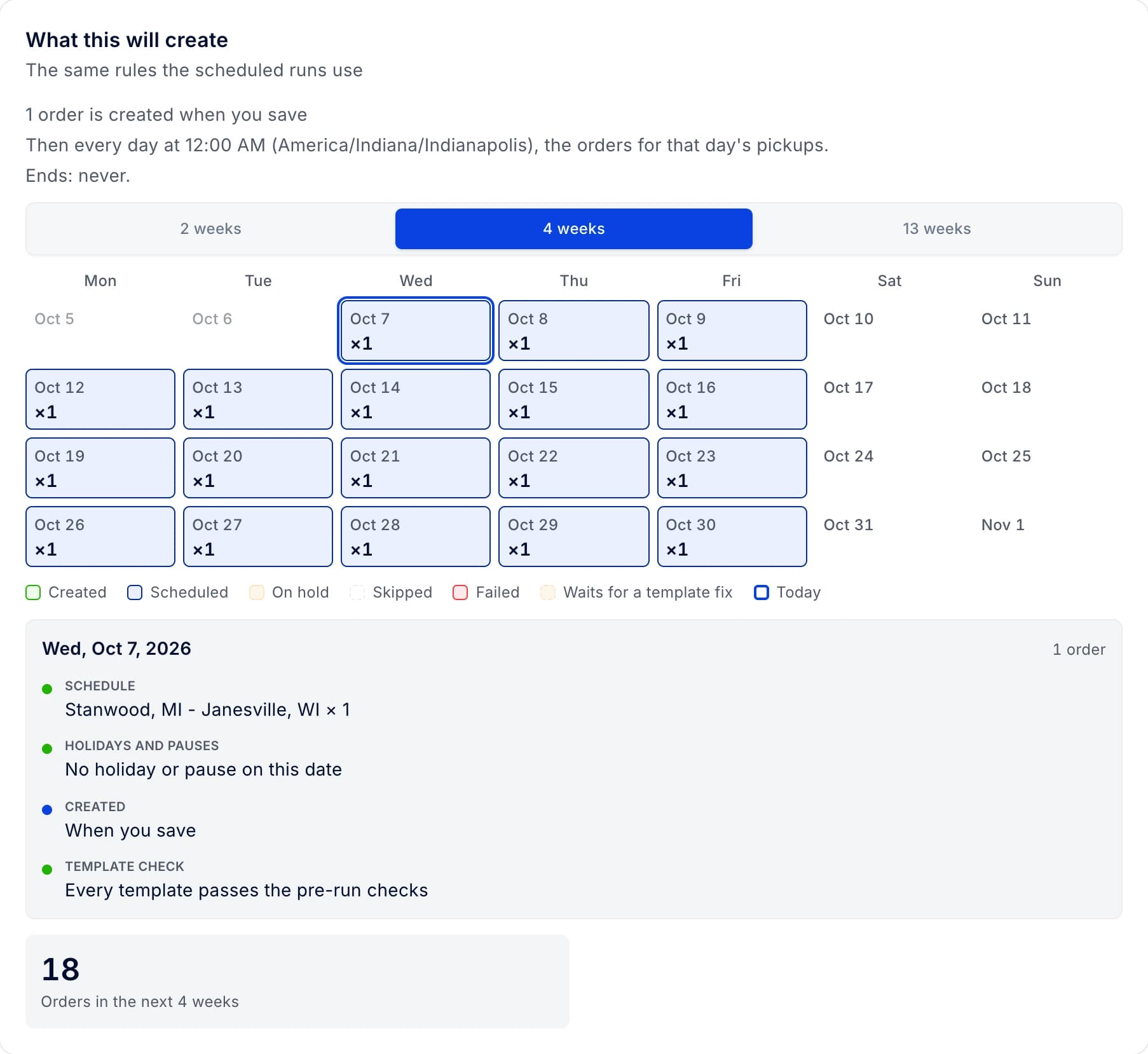
Setting up a recurring order shows what it will create, day by day
- Why we changed it
- The setup simulation gives a sentence on what saving creates, the daily cadence, how it ends and the last order date, with a 2/4/13-week calendar from the first pickup and tiles for orders in range and dates waiting for a template fix. Templates are picked in a searchable, client-scoped picker showing lane, stops, pickup time, equipment and readiness, and a failing template can be fixed in place through a Fix dialog. On the Schedule tab, editing shows a live effect card with orders added, removed, moved and kept before saving.
On the map's Split view, finished legs of a split chain fold to one line in the Stops tab, so the leg under way is right at the top
- Why we changed it
- A finished leg shows its heading line, "A · M-5228-A · Completed", plus a chevron, and clicking the heading or pressing Enter opens and folds it. Picking a stop of a folded leg on the map, or stepping to it with [ or ], opens its leg. Running and upcoming legs never fold.
Settlement cycles are redesigned, with a cycles board showing setup health, a pay calendar and every cycle's open period.
- Why we changed it
- Each cycle gets pages for its schedule with a live preview from the settlement engine, drivers, periods, automation and activity. A company without a cycle gets a First cycle screen that creates the cycle as the default, puts every driver who gets settlements on it, and runs it.
Driver status shows Active, In background · tracking, or Offline, with when the driver was last active.
The load map no longer slows down clicks and typing in the load panel while it follows the truck
- Why we changed it
- The manifests map gets the same change.
Settlement templates can use the new Statement layout, which keeps each table's title and header with its first rows
- Why we changed it
- Pick it in the Create New Template dialog or the template's type switch under Settings, Document Templates, Settlements.
A manifest's manual gross can be reset back to its calculated gross
Critical notifications reach drivers on more of their devices, iPads included
- Why we changed it
- When a driver has no device to reach, the dispatcher still sees "driver has no device".
Fuel providers are set up, managed and tested from Connections
- Why we changed it
- The fuel tiles no longer appear in the integrations catalog, and connecting, disconnecting or testing a fuel provider reports "Fuel providers are set up and managed in Connections." The WEX import policy settings still save as before.
Fuel transaction totals use your company's fuel unit.
- Why we changed it
- Companies that use litres no longer see a gallon total and a gallon-based average price.
Carriers can stop the text messages drivers get when a manifest changes, under Settings → Drivers.
- Why we changed it
- Push notifications to drivers still go out.
Uploading a renewed annual inspection, medical card or other expiring document replaces it, keeping the old version in history.
- Why we changed it
- Before, a renewed annual inspection became page 2 of last year's, so the old inspection still opened. Add pages moves into the ⋯ menu, so a missed page can still be added. Documents that don't expire, such as POD, BOL and rate confirmation, work as before.
The Status column in a settlement's Recurring Presets is narrower, so more of the table fits without scrolling.
Check Out now opens with the current date and time and validates it against Check In.
- Why we changed it
- Check Out cannot be earlier than Check In, but can be the same time.
The driver profile's Devices block lists how the driver signs in to the driver app: phone, Apple or Google.
- Why we changed it
- Each connected account shows the day it was connected.
Trucks show weights in the company's unit, and the IFTA block appears only when IFTA applies to the company.
- Why we changed it
- A company working in kilograms or tons sees and edits truck weights in that unit. The New York HUT field shows only when the US is declared. A company on pounds with the US declared sees the same fields, labels and values as before.
Recurring orders can be set up and managed in one place, with a preview of the orders each change makes.
- Why we changed it
- The list has saved views: All, Needs attention, Generating, Paused and Ended. On a recurring order's calendar, a date can be skipped or moved, its quantity changed, or extra orders added.
Fuel transactions show the US-only State and IFTA controls only where IFTA applies.
- Why we changed it
- IFTA applies to companies that operate in the US or Canada. For other companies, the State and IFTA columns, the IFTA bulk actions and the IFTA checkbox on a purchase are hidden. A new fuel purchase starts with the company's address country instead of always United States.
Seven new dark themes in Appearance: Gray, Indigo, Plum, Pine, Harbor, Ember and Merlot.
- Why we changed it
- The theme picker shows compact tiles in two columns, each with a colour swatch and the theme name. Every existing theme, and every saved choice, stays exactly as it is.
On the Drivers page, the sign-up invite and the login link are now told apart.
- Why we changed it
- The sign-up invite says signing up creates a new profile, and points to a login link from the profile for a driver already on your list.
Export on the Drivers page exports only the selected drivers when rows are checked.
- Why we changed it
- With nothing checked, the export follows the page filters as before.
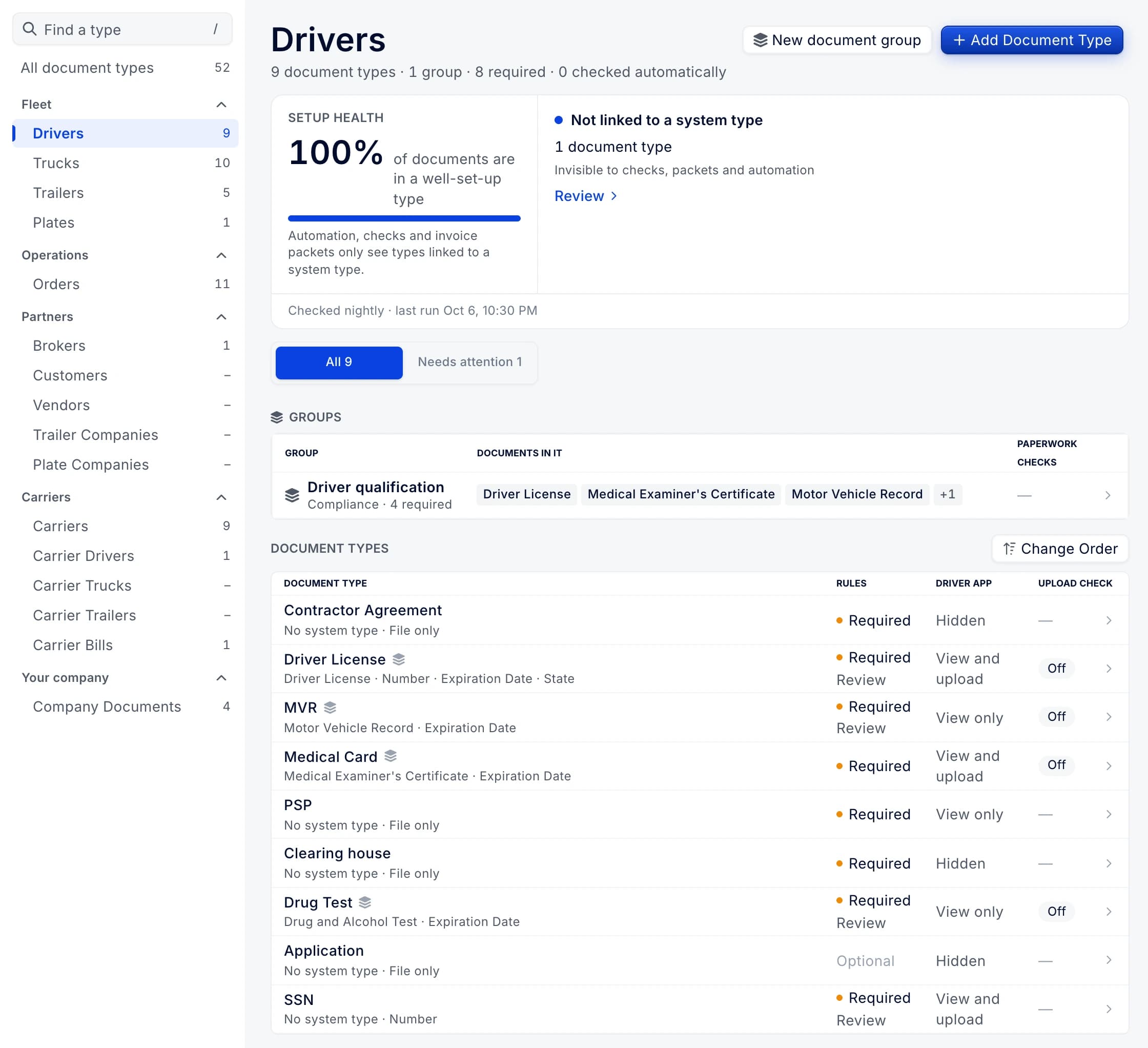
Bank Account Verification is available as a document type in document type settings.
Add Driver takes the driver's phone number and offers to send the login link.
- Why we changed it
- Without a phone, the driver could not sign in to the new profile, and signing up in the app created a second one. On the Drivers page, adding a driver with a phone opens the Send login link window for the new profile.
Each loan and escrow has its own account, showing what is owed or held with its full history.
- Why we changed it
- Before, a loan was a recurring charge with a maximum and a progress number. Recurring presets are grouped into ongoing charges, loans and escrow. Payments made outside settlements can be recorded and corrected, and a settlement shows every loan and escrow with one-click deduct.
What's new lists each release as its cover and a few lines at a glance.
- Why we changed it
- A release opens on its own page with At a glance, Features, Improvements and Fixes, then the feedback box. Improvements and Fixes show their first seven rows, with Show more to reveal the rest.
The Highway connection page gives you a ready email for your Highway contact and copies any value with one click.
- Why we changed it
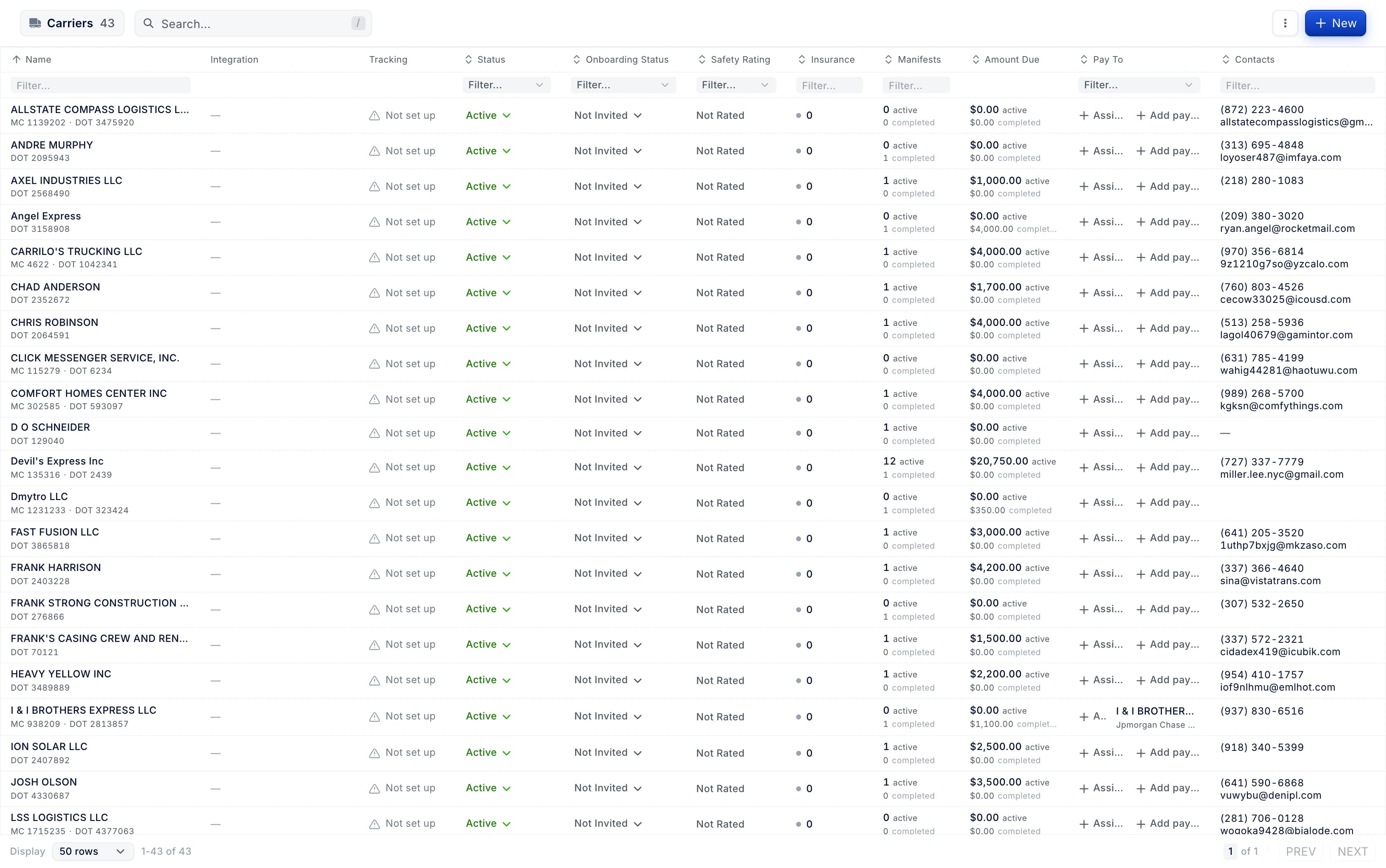
- A saved API key shows its last characters, and Activity filters by what each integration actually sends. The carriers list gains a Tracking column, and Send rate confirmation remembers full screen and shows Carrier Intelligence.
Companies can turn on a payout hold after a payee's bank details change, in Settings → Payees.
- Why we changed it
- Held payees show an "On hold" badge and a banner with the hold's end. People allowed to change payout statuses can release a hold with a reason.
Companies can choose whether EFS takes its money code fee out of the code; when it does, the driver's deduction carries no fee.
- Why we changed it
- The setting is under Settings > Money codes > EFS Fee.
Check calls can be logged on an order running on a company truck.
- Why we changed it
- Before, a check call could only be logged on a carrier load. The order overview now shows the check call button beside an assigned company truck.
Amazon Relay supports several connections, each with its own API key you can copy at any time.
Driver photos load faster, and the dashboard reuses them on later visits instead of downloading them again.
The Documents tab badge counts what the order's document packet still needs, and the customer invoice previews only when you ask.
- Why we changed it
- The customer invoice card shows "Preview invoice" and builds the PDF when you click it.
A paper a driver sent says so on its card, with how long ago it came ("From driver · 12 minutes ago").
- Why we changed it
- Approving or editing a paper no longer makes it look new.
Papers a driver sent since you last looked are marked New on the order's Documents tab.
- Why we changed it
- The marker covers papers a driver uploaded in the last 7 days.
A settlement cycle whose period wasn't closed on time shows as Overdue, with Run now to catch it up.
- Why we changed it
- "Add a past period" used to copy the earliest period's length, which was wrong for monthly and semi-monthly cycles. It now starts with the dates the schedule would have used.
Undoing a page move says, for each paper, whether its approval or rejection came back or whether it needs review.
Driver pay plans get their own pages, with every rule priced on example loads.
- Why we changed it
- A plan prints for drivers to sign, and a load calculator prices loads with the same code that pays. Drafts are published as dated versions.
Hovering the "Paperwork verified" checkbox in Billing shows who verified the paperwork, when, and why.
- Why we changed it
- Orders verified before this change show no name.
Dispatch can ask a driver to fix a paper, giving a reason, pages and a note.
- Why we changed it
- The request is made from the order's Documents tab, the page view or the document viewer. The paper shows whether the driver has been asked, has sent it again, or whether the automatic check asked them.
The Documents Review page is a full review queue, with All, Flagged, Not checked and Passed buckets and their counts.
- Why we changed it
- Each row shows the first reason a paper was flagged. In review mode, approving or rejecting a paper moves to the next one. Unsaved field decisions are kept for each document while you move between papers.
After a rate confirmation is read in New Order, the order shows how many fields came from the document and which ones to check.
- Why we changed it
- Those fields are marked, each value shows where on the document it was read, and the fill can be undone. Reading a document again asks first when it would replace your edits.
Driver pay can be brought up to date in bulk when a pay plan gets a new version.
- Why we changed it
- A dry run shows what each load would pay, rows can be left out, and the run is followed to the end. A "Needs attention" list shows unpaid driver pay that no longer matches its pay plan. The manifest's Driver pay tab says which version paid the load and what the newer version would pay.
In the order's Documents tab, the packet counts papers that are not checked automatically as present and marks them "Not machine-checked".
- Why we changed it
- The packet covers only the invoicing sets, the paperwork the order is billed with. A paper the office rejected is labeled as rejected, not as fields to review.
The recurring presets page stays responsive while it refreshes, and switching to the stacked view is faster.
- Why we changed it
- The preset summary no longer states that held money is returned within 45 days of termination.
When sign-in fails, the page says what happened and offers a way in.
- Why we changed it
- When texts can't reach the phone, the code can be sent by email instead, or the user can text START to turn texts back on. A paused sign-in shows a live countdown, and the page gives a support reference.
If a sign-in text never arrives, the code screen says why within seconds and offers the code by email.
- Why we changed it
- Admins see on the Members page who can't sign in, and can unlock them or email a reset link.
A switch under Settings → Settlements → General shows drivers their loans and deposits in the driver app.
- Why we changed it
- The switch is off until a company turns it on. Only people who can edit loans and deposits can change it.
Pay plans can keep test cases: saved loads or pay periods with the pay they must produce, and every publish checks them.
- Why we changed it
- The load calculator prices a whole pay period. A rule is edited in a side panel where per-mile rates can be split into distance bands, each with an example priced by the server.
A settlement shows its status history: every status change with who made it, why, and when.
- Why we changed it
- The Status history card sits under Emails on the settlement detail.
Settlement lines that take back driver pay are marked as reversals, say why, and link to the line they reverse.
Signing in with an outside provider for an existing password account leads to a guided recovery path instead of a dead end.
- Why we changed it
- After signing in to the password account, the Connected accounts window opens to link that provider. A matching email never joins accounts on its own.
Pay plans download as a PDF in the company's chosen design (Modern, Classic or Ledger) and can be previewed in any design.
- Why we changed it
- On the pay plan page and version history, the print button is replaced by Preview and Download, with a menu of designs. Carrier companies get a new Pay plans tab under Document templates in Settings.
Invoice item categories show what each one counts as for paperwork verification and suggest a value from the name.
- Why we changed it
- A banner above the table shows while any category is unmapped. Paperwork verification checks an order's charges only when every category on it is mapped. All suggestions can be applied at once after a review.
On an order's Documents tab, the invoicing packet shows its paperwork check result, with a new Checks view listing every check.
- Why we changed it
- The Checks view shows each check with the page it was read on. From there you can accept a check, verify anyway with a reason or reopen verified paperwork.
Settings › Documents shows how each order paperwork group is verified (Off, Trial or On) and lists the checks it runs.
- Why we changed it
- Admins can switch checks on and off and choose what happens when one fails. Each check's panel shows what it reads, what it is compared with, its tolerance and why it matters.
In an order's paperwork Checks, the checks that could not run are folded under one line that says why.
- Why we changed it
- Blocks and Review stay open.
Settlement cycles: a re-click after a lost reply no longer creates a second cycle.
- Why we changed it
- An overdue cycle says when it should have closed instead of "today", and Close early names the next close. The settlement detail marks loads, fuel and tolls carried in late with the period they belong to, and the Cycles entry in Settings shows how many cycles are active.
A manifest's Driver Pay tab explains pay taken back from a removed driver.
- Why we changed it
- It shows which settlement held the pay, how much was reversed and which settlement the reversal went to, or that it is due on the next open settlement. Each settlement and the reversal line is one click away.
Amazon Relay is managed in Connections.
The notification bell in the dashboard updates live.
Changing whether drivers see their loans and safety deposits in the driver app requires permission to edit recurring transactions.
Batch Send Invoices shows the total invoice amount of the batch next to the orders count.
- Why we changed it
- The total includes orders marked Skipped.
The order's Documents tab starts with the invoicing packet: each paper's state and one action for each one still outstanding.
- Why we changed it
- Optional papers are faded, and hovering a segment shows the paper and its state. The packet refreshes every 30 seconds, like the documents.
On the map's Split view, a split chain shows which leg is running and the truck that takes over next.
- Why we changed it
- Stops are lettered by leg (A1, B2) to match the stop list. A pending handoff is labelled with its place and the running truck's ETA there.
The load, scheduling and driver, truck and trailer profile maps remember satellite view for the next load or profile you open.
- Why we changed it
- Each map keeps its own choice.
Drivers can be moved between settlement cycles in bulk from a cycle's Drivers tab, and each move says when their pay switches.
- Why we changed it
- "Add drivers" also lists drivers who are on another active cycle. When a driver moves off an active cycle, the new cycle pays what comes after the old cycle's open period closes.
Recurring transactions can import loan and escrow openings and outside payments from a CSV file.
- Why we changed it
- Loans that are really escrow can be reviewed and converted in one step.
Repair on a stopped settlement cycle with an open period says saving catches up the missed periods, one every 30 minutes.
- Why we changed it
- The missed periods fill in with automatic settlements, and the link to add a past period is gone. A cycle with no open period keeps today's behaviour.
Approving a driver's money code request starts with who pays: the customer on the order's invoice, the driver's pay, or the company.
- Why we changed it
- A lumper requested from a load starts on the order's invoice, and a cash advance starts on the driver's pay. Any other category starts unpicked, and both Approve buttons stay off until the office picks who pays.
On a settlement, a loan's instalment can be changed or skipped for that week only.
- Why we changed it
- The settlement shows how much is safe to deduct above your net pay floor. Loans that need attention can be reviewed, many presets can be paused or ended at once, and who recorded each payment is shown.
A detention's report can be added to its order's documents with one click from the detention panel.
- Why we changed it
- Until now the report lived only on the detention board. One click files the same report Send summary attaches, and no email is sent. It appears on the order's Documents tab as Detention Report.
EDI tenders show how long is left to respond, and expired tenders stay on the board marked Expired.
- Why we changed it
- The countdown shows on the Tenders view, in tracking and in order details.
The order's Documents tab shows who owns the paperwork and why, and lets you hand it to a person.
- Why we changed it
- Required papers not received hours after delivery are flagged. While driver work waits, the packet shows its escalation deadline, such as "Escalates in 22h".
Settlement cycles have Driver and Staff tabs.
- Why we changed it
- A staff cycle shows who it pays, each period's approve-by date and the tax year a run counts toward. Any driver cycle can run an off-cycle settlement.
Driver and staff pay profiles show how a person is paid, with the full dated history, and can be changed from a date.
- Why we changed it
- On a driver's page, Paid as shows the profile in effect today and opens the panel. For someone nobody has classified yet, the panel offers a suggestion with its reason and a "Use the suggestion" action.
The settlement window has a Payments card with the paid date and amount, what is not recorded yet and every payment.
- Why we changed it
- Record payment takes a paid date no later than today, an amount, method, reference and note. Voided payments stay listed, struck through, with the reason. Import payments on the settlements list reads a CSV of up to 500 rows.
Arrival, check-in and check-out times start from the current time at the stop instead of the appointment.
- Why we changed it
- They can't be saved in the wrong order or in the future. The Edit Stop window shows the arrival time. The appointment is a one-tap chip under Arrived and Check-in.
An invoicing company can choose how much detail its order invoice PDF shows.
- Why we changed it
- Total prints one summed line, labelled with your own text or "Flat Rate" when left blank. All keeps the per-item breakdown and stays the default.
A driver's or vendor's individual pay plan can be deactivated right from their profile.
- Why we changed it
- Deactivate appears under the Revenue Type field in Edit driver and Edit vendor.
An order can be made recurring from its details: setup opens with the client, the order as a template and its weekday already filled in.
Recurring orders suggests the lanes you keep creating by hand, and turns one into a recurring order in two clicks.
- Why we changed it
- A lane qualifies with 6 or more orders in 8 weeks, or 3 or more in 3 weeks. Lanes an existing recurring order covers are left out. The new order form suggests it too.
The orders and manifests boards show each load's carrier tender: its status, the clock, carrier pay and driver tracking.
- Why we changed it
- Hovering it shows the carrier's contact. Order details show what still needs setting up.
The order's Checks view shows the AI's opinion on name and note checks, and a second AI read's flags, as advice next to the evidence.
- Why we changed it
- When the AI opinion disagrees, a person decides the check.
Paperwork notifications in the Inbox open the order straight on its paperwork checks.
Once an order's paperwork is verified, its invoicing papers can no longer be replaced or deleted.
- Why we changed it
- Until now, the Documents tab still offered Upload and Replace on those papers after verification. The tab now says why they are locked and offers Reopen paperwork.
A document group's Paperwork checks card shows how it differs from the default and goes back to it with "Use default".
- Why we changed it
- Switching paperwork checks On lists exactly what changes. The settings use one vocabulary: Paperwork checks, Upload check and "Suggest asking the driver".
Address fields when registering a company show examples for the selected country.
The recurring orders list can skip a date, pause or delete many recurring orders at once.
- Why we changed it
- Summary tiles show Active, Orders · 30 days, Upcoming · 7 days, Unassigned · 7 days and Needs attention. The Unassigned view lists booked orders from recurring orders with a pickup in the next seven days, soonest first.
A recurring order's earlier schedule can be restored from its activity.
- Why we changed it
- A schedule change can cancel the booked orders it removes, and deleting a recurring order can cancel its upcoming booked orders. Orders with a truck or carrier stay.
Every order a recurring order created can say why it exists.
- Why we changed it
- Open "Why?" in the recurring order's Orders tab to see the rule, the checks and the run that created it.
Customers can have their own recurring-order rules, such as a different run time, days ahead or holiday handling.
- Why we changed it
- The holidays list shows which orders each holiday will skip or move, before and after you add it.
A company can limit how many payout accounts a driver adds from the app and ask for a voided check or a bank letter with a new bank account.
- Why we changed it
- The rules are set in Settings → Drivers → Driver Payees. The approve window of a request for a new ACH or wire account shows the bank document the request pins.
Dispatch Sheet and Invoice templates can choose which order custom fields to print, and in what order.
- Why we changed it
- On the Invoice, an empty choice keeps printing all fields.
Closing a settlement period early is one step, and the confirmation and the success message name the next close.
- Why we changed it
- The rest of the period's window opens as the next period and keeps the scheduled close. Late fuel, tolls and loads on a settlement show the period they come from, including loads counted by actual delivery date.
Closing a settlement period early keeps its dates and pay date; loads delivered after the close go to the driver's next settlement.
- Why we changed it
- Deactivating a cycle now closes its open period.
Moving drivers to another settlement cycle tells you when the new cycle first pays them.
- Why we changed it
- The first-cycle screen keeps Create and Adjust disabled until your drivers load. The Settlements cycle picker works with the keyboard.
NACHA bank settings can be configured, with a test file to preview before applying them.
- Why we changed it
- The test file is generated, previewed and downloaded from unsaved settings. Existing NACHA configurations keep their current export behavior.
Saving a settlement cycle's schedule or automation settings after someone else changed them shows "Changed by someone else" with Reload.
- Why we changed it
- Before, the later save silently overwrote the other person's change. Reload brings in their change and keeps your edits on screen to save again.
Settings has People & classification, where you see and set how each staff member or agent is classified and paid.
- Why we changed it
- It has lists for Not classified, Missing payroll ID and Missing evidence.
Settlement cycle schedules offer noon, 5 PM and 6 PM as quick closing times next to End of day.
- Why we changed it
- A close set between 11:55 and 11:59 AM shows a hint with Use End of day.
Settlement cycles show a midnight close as "Midnight, end of Sat" and suggest End of day for an 11:59 PM close.
- Why we changed it
- Past periods are added by day, and periods load 25 at a time or all. Pay dates show before and after a pay change.
Settlement cycles show how many days each cycle makes owner-operators wait for pay.
- Why we changed it
- It shows on the Drivers tab, in Add drivers, the move dialog and the schedule editor.
A packet missing a paper type in setup says which one, for example "This packet needs a Proof of Delivery paper type."
- Why we changed it
- The message appears on the order packet and on the paperwork status chip. A Set up paper types link opens Settings › Documents on the order types to link.
In Billing, an order's panel now opens with its paperwork (Documents) right under the customer, above Invoicing and Payments.
In Billing, the order panel shows the paperwork check like the order's Documents tab.
- Why we changed it
- It shows the status, owner, papers not received, Verify and Reopen, and who verified. Unticking Paper Verified in Billing, Batch invoice orders and Receivables opens the Reopen paperwork dialog, which requires a reason. J/K moves between orders.
In Billing, undoing a bulk paperwork verify asks for a reason when paperwork checks are On; in Trial the undo stays one click.
The paperwork owner line says when Operations managers and admins stand in because nobody holds the owner role.
- Why we changed it
- Before, the line said "Accounting" even when nobody could act. It now names the gap, such as "Dana Doe is inactive". Ownership moves back on its own once someone can take the step.
The carrier card shows carrier pay on completed manifests, and each carrier pay amount opens the manifests it adds up.
- Why we changed it
- The in-progress amount used to open the Orders tab unfiltered. The completed amount counts every delivered manifest of the carrier, whatever the order's invoice status, and leaves out canceled and deleted orders.
The carriers list shows a carrier's VAT, registration and transport licence numbers for companies outside the US.
- Why we changed it
- US companies keep the MC and DOT numbers.
A recurring order's template row can link a return leg: same day, next day or two days later, with its own time.
- Why we changed it
- Each outbound order is created together with its return. Skipping or moving the outbound date does the same to its return, which keeps its own truck, rate and reference.
Document workflows use your market's customer and carrier terminology and keep references and custom names.
- Why we changed it
- European companies see Customer Booking Confirmation and Transport Order; North American companies keep the existing names.
Editing a broker asks for the identifiers the broker's country issues.
On the order Documents tab, the owner can ask the driver for a paper that was not received.
- Why we changed it
- Paperwork status, owner and Verify show right away, and a plain verify is never offered while a reopen is being checked. After an ask, the line shows who was asked and when, how many reminders went out, and Cancel ask.
Order details fits smaller screens.
- Why we changed it
- Drag the handle above the tabs to resize the map, fold the notes away, and filter stops with the funnel next to the manifest.
Recurring order schedules can repeat monthly by weekday or on specific dates.
- Why we changed it
- Monthly by weekday repeats in the 1st, 2nd, 3rd, 4th or Last week of the month. Appointment times can be set per template for each weekday. The simulation and day details show the time each order gets.
Recurring orders can be duplicated for another client or lane, and a Results tab shows what their orders came to.
- Why we changed it
- The Results tab shows a hint when one weekday keeps getting deleted. Duplicating never changes the original recurring order.
Recurring orders have three modes: Create orders, Create for review and Remind only.
- Why we changed it
- A To review tab lists the dates waiting for approval, with Approve / Create now and Skip on each row and in bulk. A recurring order with a date due shows a banner that offers Skip and Create now or Approve. Notifications about dates due open the To review list.
Recurring orders show a Template checks section on the schedule tab when a template has an issue.
- Why we changed it
- Each issue gets its own row for the client, stops, equipment type, load type or rate, with what it means for the orders and Fix. A company reference pattern for recurring orders must include {id} as well as {n}.
Review new clients and contacts on a new order; they are created only when you submit the order.
- Why we changed it
- Before, the rate confirmation preview and the client picker on the new order screen could create a broker or invite a contact before Submit. A contact with a name or phone needs an email before the order can be submitted.
Set on map in a new order opens a large satellite map where you move the map under a pin to mark the exact unload point.
- Why we changed it
- Your other stops, facilities and saved locations show around it, and you can find places in the area and set one up as a facility. The map keeps the stop address separate from the exact unload point.
Settings → Integrations has an EDI page for requesting a trading partner connection, and Loads counts EDI tenders waiting for an answer.
- Why we changed it
- The connection request is written as the carrier picks the partner and documents, then opens in their own mail app or can be copied. Companies already trading over EDI see their trading partners with each document's status. The count on Loads covers EDI tenders received in the last 72 hours.
The Tenders view on Orders shows how many EDI tenders are waiting for your answer.
- Why we changed it
- The red count covers EDI tenders received in the last 72 hours and appears for companies with EDI connections.
The dispatch schedule shows late, arrival and departure status on each stop block without hover.
- Why we changed it
- Before, seeing whether the driver arrived, departed or missed the appointment window meant hovering or leaving the board. A red late mark appears when the arrival came after the appointment end, or that end passed without an arrival.
Three new permissions decide what a user can change in recurring orders.
- Why we changed it
- Without Manage, controls show the hint "Ask a dispatch lead to change recurring orders." Without Company settings, Settings > Recurring orders is read-only and says "Ask an admin to change recurring order settings."
When the order's driver can't get notifications from the driver app, "Ask driver" is disabled and says why.
- Why we changed it
- An open ask says no push reaches them.
Drivers page search finds a driver by license number when the view has a Driver License column.
- Why we changed it
- Trucks and Trailers searches also match the numbers of their document columns, such as registration and permits.
The location page has an Equipment tab listing the trailers parked at that address or inside the facility's geofence.
- Why we changed it
- On the map, a trailer's row says what its position proves instead of showing N/A.
In the telematics vehicles and drivers windows, a link with no recorded connection shows a "Connection unknown" warning.
The retired True Logbook integration no longer appears in Settings → Integrations, and old links open the integrations catalog.
Three retired telematics integrations no longer appear in the integrations catalog.
When the What's new popup brings a single new feature, it opens in full instead of behind Show more.
Contract pricing can select a rate sheet automatically while keeping deliberately pinned sheets.
- Why we changed it
- Draft and invoice recalculation offer an Automatic (from contract) option.
In the rate matrix, a unique city search creates a city radius directly, and the next lane reuses the lane setup.
- Why we changed it
- A new lane keeps the origin, rate type, effective dates and priority, and leaves the destination and rates empty.
Rate sheet imports open directly with the built-in reader instead of offering reader choices that are not available.
Rate sheet imports recognise more tariff layouts and keep equipment and additional-mile rates across tabs.
- Why we changed it
- Recognised layouts include tariff tabs with an equipment suffix, Rate, Line haul or $ labels, repeated headers and origin by destination matrices.
Rate sheets have a company backup order, and contracts can opt into company backup sheets.
- Why we changed it
- The contract backup switch starts off on a new contract.
Saved lanes show a read-only preview of distance, tolls, fuel and total before pricing a load.
Staff pay runs can be reviewed, locked and approved from a staff cycle's period.
- Why we changed it
- The run shows totals that foot and the checks to clear before it is approved. Above the company threshold it needs two approvers.
Integration connections show the health of each kind of data and why a connection stopped.
- Why we changed it
- A one-click Reconnect or Update credentials sits on the connection that needs it. The connection page adds the sync history.
Marking a Venmo or Cash App payout paid asks what kind of transfer it was.
- Why we changed it
- Choose business, goods and services or personal. The payee's 1099 then leaves out what the app already reports.
Fixes 103
Unassign no longer appears in the Driver column of the Trailers list or in the Trailer column of the Drivers list
- Why we changed it
- Direct unassigns on the Trucks list, vendor trucks, the Truck cell and profiles are unchanged.
A file upload that fails on the server again shows the screen's own message, such as "Error uploading file"
- Why we changed it
- A refused file still shows the reason it was refused.
Maintenance service schedules use your company's distance unit for odometer intervals and due distances
A schedule with no manifests no longer shows the previous schedule's routes on its map
- Why we changed it
- In Planning > Schedules, the empty schedule's map kept drawing the previous schedule's routes in grey and stayed framed on them.
Truck and trailer profile headers keep the unit number on one line; long unit names are shortened with the full name on hover.
A stop whose time zone is unknown no longer shows the company's zone on its appointment
- Why we changed it
- The appointment label fell back to the company zone, for example CDT titled "Timezone: America/Chicago · Company". The label is now empty until the stop has a zone, which covers an extracted stop whose geocode failed and a new stop with no address yet.
Saving the Edit cycle dialog keeps a settlement cycle's frequency and pay date rule
- Why we changed it
- One Save on a monthly or semi-monthly cycle, or on one paying on the previous business day, turned it into a weekly cycle paying as scheduled. The dialog now sends the cycle's own values for frequency, closing month days and pay date rule, so an edit leaves them unchanged.
A PDF document no longer jitters in the viewer on Windows when the page almost fits the window.
The carriers page shows on each Highway connection tile when the last sync ran or that it failed
- Why we changed it
- Every Highway connection gets a second line under its name: "Synced 4 hours ago" in grey, "Failed 16 minutes ago" in red, "In progress · 3 / 5 carriers" with a spinner. A paused connection is resumed and synced with one button, "Resume and sync", and the connection menu now reads as a card with the connection's own state and the last run's details.
Template names and text settings stop at the length the server accepts, instead of failing on Save with a technical error
- Why we changed it
- A template name stops at 256 characters with "Maximum 256 characters" under the field, in the PDF template editor, the settlement "Add template" dialog and the settlement template name field. Text and text-area settings stop at 512 characters, and from 460 characters a counter such as "470 / 512" shows how much room is left.
Filled-in PDF forms added to a document keep the position of their checkmarks and values
- Why we changed it
- Checkmarks, N/A marks and text values were scattered over the top of the page and the form itself shrank towards the bottom after an inspection PDF was added to a document. Pages are now measured by their visible area, and pages already Letter size are left alone.
An order created from a template saves even when the template holds an unreadable stop appointment
- Why we changed it
- The stop shows as needing an appointment, which the new order screen already asks for at submit.
Choosing an option under Settings, Organization, Routing Config in the "Manifest split numbering" section saves
The dispatchers list loads again
New fuel accounts are set up in Connections
- Why we changed it
- A fuel provider a company has not connected before is added in Connections. A company that is already connected keeps working and can still repair its login.
The Driver Pay panel on a manifest shows the assigned driver again
- Why we changed it
- The panel said "You have no drivers assigned" while a driver was assigned. The driver now shows with the settlement number and status.
A file that is not really a PDF or image is refused, with a message that names the file
A document waiting for review shows amber in the fleet tables and the profile's document count, not the red used for expired ones.
- Why we changed it
- An expired Pending document stays red.
Create Manifest no longer crashes when a stop's Appointment Type changes to Range or Need to set.
The document group editor no longer lets you add a document type next to its own system type, so one upload can't fill two rows.
In guided setup, the period close time uses the 24-hour clock for a company on the European time format.
Registering a Spanish or Portuguese company from the Canary Islands or the Azores starts in the island timezone.
New fuel accounts are set up in Connections for every company without a legacy fuel login.
An active vendor or company settlement template explains why it cannot be deleted, and a recurring preset's delete confirmation names it.
- Why we changed it
- The last template of a kind can still be deleted.
Fuel surcharge rules built from older bracket tables show a charge when the DOE price has three decimals, for example $6.382.
- Why we changed it
- The bracket editor no longer warns about those sub-cent gaps.
The appointment line on a stop's place insights card pools business days and states weekends separately.
- Why we changed it
- It no longer shows the building's overall wait median as the appointment's wait.
A document template setting you just typed is kept when Save is clicked immediately.
A refused file shows one message, naming the file, instead of two identical ones.
- Why we changed it
- The message for a refused upload stays on screen for 8 seconds. A refusal when sending to factoring appears once, in the banner, with an Open order link. In the invoice email window, a refused invoice generation shows where the preview would be.
Closing the Operating Countries list with Escape keeps your selected countries.
The "What's new" popup no longer opens over a dialog you are working in; it appears once you close it.
Forgot password stays available to try again when sending the reset email fails.
- Why we changed it
- A double click on the reset button no longer shows a failure after a successful reset.
Loan and escrow actions no longer record twice on a double press.
- Why we changed it
- A failed undo says why and can be retried. Applied review fixes can be undone from the review list for 5 minutes.
The 1099 Annual Summary counts each tax year by pay date.
- Why we changed it
- Box 1 (Box 1a from 2026) is gross pay and is checked against the year's filing threshold: $600 for 2025, $2,000 for 2026. A contractor under the year's threshold needs no 1099, and a missing TIN does not block them.
Reopening a pay plan's editor shows the changes saved on the previous visit, and editing on no longer reports a draft conflict.
Release hold works on a payee with a payout hold.
A new invoicing company without a DOT number keeps its DOT empty instead of 0.
An invoicing company can be created without a state when its country has no state options.
- Why we changed it
- US, CA and MX addresses still require a state.
Terminated drivers can be selected again when editing a fuel transaction.
When a carrier's email already has an account, Sign opens the sign-in window and continues signing after they log in.
- Why we changed it
- Before, the page showed only a red line, with no window and no button.
"Open on map" links land on their record even when the map was left on another view, without a wrong "not on the map" message.
On the tender accept page, a refused sign-in code says why and offers the way in.
- Why we changed it
- The terms checkboxes sit next to their text, and the rate confirmation downloads after signing with a short countdown instead of on Accept Load.
Times on the other side of a daylight-saving change are no longer an hour off in countdowns, lateness and sorting.
A loan line, preset or deduction on a settlement is no longer added twice.
- Why we changed it
- Escrow can be refunded from the settlement's Loans strip, and settlement totals refresh within seconds after an edit. Restoring a deleted line follows the delete permission.
An integration that cannot run yet can no longer be connected or resumed, and its page says why.
- Why we changed it
- A legacy login moved to Connections keeps what you typed and shows the way there.
The carriers list header no longer shows row details through it while you scroll.
Paperwork checks on the order's Documents tab say why a check was decided, and a cleared decision can be undone.
- Why we changed it
- Times use the company's time zone, and the Verified status no longer contradicts the Verify button after verifying or reopening.
Check calls now work on company-truck orders, and order details shows when the driver was last contacted.
- Why we changed it
- The Check Calls tab was listed only when a manifest had a carrier. A Last contact row in the order details sidebar turns red when the last reported ETA was late and opens the Check Calls tab on click.
The customer portal card no longer repeats the portal URL below the active domain link.
Paperwork checks say "No rate confirmation was read" or "Not connected to checks yet" instead of "Order data could not be loaded".
Editing a payee's tax info keeps the TIN on file when the field is left blank.
- Why we changed it
- A payee without a TIN reads "Required" in its tax section until one is on file.
Keyboard shortcut hints in dialogs show Ctrl on Linux and ChromeOS, and Ctrl+Enter confirms there.
Paperwork verification settings read in full at 1280 px, with mode descriptions, check names and every table column in view.
- Why we changed it
- Each always-on check says why it is locked, and trying a check shows per-order results.
Verifying paperwork shows how many checks actually ran, and asks for a reason when the paperwork check has not passed.
- Why we changed it
- The order's Documents tab no longer reports every check as passed when some checks did not run or required papers are missing. When marking paperwork verified in bulk, orders whose check has not passed get their own section and are left out by default.
The active status tab on Service Schedule is underlined again.
Fuel transactions again show when each purchase was uploaded, in a sortable Uploaded At column.
- Why we changed it
- Saved views with an explicit column list need it switched on.
A split manifest shows its leg number, such as M-100541-B, on the order, tracking, schedule and planning screens.
Custom closing times in onboarding use the same display format as preset times.
Paperwork checks say what they found: a receiver's note on a POD is a question to read, not an exception.
Recurring order settings show the company profile's time zone, not UTC, for a company that never set one.
- Why we changed it
- A client with no order templates shows the note "This client has no order templates yet". Company settings refuse a reference pattern without {n} beside the field, before saving. Holiday impact names recurring orders RO-2, as elsewhere.
Checks on an order's Documents tab say "Not received" when no BOL or POD has been filed.
- Why we changed it
- A check that did not run because charge categories are not mapped links to Settings › Orders › Invoice item categories.
Inspection review shows times in company time, the driver's stage before submission, and the reviewer's note under its own label.
- Why we changed it
- Until the driver submits, an inspection shows the driver's stage: Pending, Assigned, In progress or Paused. The reviewer's note sits in its own "Review note" block.
Fuel integrations are set up and managed in Connections only.
- Why we changed it
- Pressing Connect on a fuel provider could land on an old setup page where nothing connected. Links to the old fuel pages now redirect to the provider's current page.
A cycle's overview no longer shows more drivers with settlements than drivers on the cycle.
A settlement cycle's Periods table shows totals for every period, with no limit of 100.
- Why we changed it
- The rows always add up to the cycle total.
Correcting a loan payment from its account refreshes the open settlement at once.
Settlement cycle pages keep the full cycle name in the header and show owner-operators' pay wait on two lines on the Drivers tab.
Settlement cycle pages show each period's real last day and the actual close time of a period closed early.
- Why we changed it
- A weekly cycle closing Sunday at 12:00 AM now shows Oct 4 to Oct 10, not Oct 4 to Oct 11. Tables and controls fit on laptop screens.
The Weekly cycle preset now says it ends at the end of Sunday instead of 11:59 PM.
When you approve a driver's new bank account, the document check shows its verdict together with the numbers it read.
On the analytics page, the billed total reads Billed everywhere instead of also Revenue or Agreed.
An order's Checks view and the document group settings call papers by your company's own names, such as "BOL (Pickup)".
- Why we changed it
- The keyboard legend lists V for Verify in both views.
Billing → Paperwork flags a missing required document, such as a BOL, in red again.
- Why we changed it
- A Pending document without a file now counts as missing.
Each "Every required paper is here" check sits under the paper it names.
- Why we changed it
- Before, every one was listed under the Rate Confirmation. The owner card shows the escalation deadline in hours when it is under 48 hours away, for example "47h". Cmd/Ctrl+Enter submits a paperwork dialog from anywhere in it.
In Billing, an order's panel shows its papers two a row and lines up each missing paper's actions.
- Why we changed it
- The owner's name stays readable, and the Paper Verified column stays in view while the panel is open.
In Billing, the Paper Verified column stays next to the order's ID while an order's panel is open, so you can verify the order from its row.
- Why we changed it
- When the panel closes, the column goes back to its place.
In a batch's orders table, the Invoice column shows each amount in the batch currency.
- Why we changed it
- It showed bare numbers such as 1200.0 with no currency. The balance chip on an order shows Paid in Full only for a zero balance on an invoice with a positive total.
In an order's Checks view, a check that did not run no longer offers "Accept…".
- Why we changed it
- It shows what to do instead: map charge categories, fix the order, or add or ask for the missing paper above.
Papers missing after delivery offer "Ask the driver" and "Office has it" when the packet member comes from a template.
- Why we changed it
- Before, the packet hid both actions for these papers.
A broker created when you submit an order shows its name on the opened order instead of "(undefined)".
A carrier's signature is no longer cut off when a new version of the app is released while they are signing a tender.
Assigning a truck no longer shows an error when Enter is pressed more than once while the assignment is saving.
Brokers verified from imported rate confirmations stay visible and can be created when you submit the order.
Carriers can finish accepting a tender when they need to log in or sign in with a code.
- Why we changed it
- A release no longer cuts off a signature in progress.
Dropping an email attachment from webmail onto a new order explains that the file has to be downloaded first, instead of doing nothing.
Editing a recurring order's schedule no longer deletes return legs set over MCP.
New order keeps an extracted broker name visible when you close its picker and shows when a broker still needs selecting.
Order Details and Edit Order no longer offer Assigned before a truck or carrier is on the order, and the option says why.
When a carrier user's role cannot accept a tender, the page names the permission they need, for example Create Order.
A trailer or truck with no ownership chosen shows "Not set" instead of "Owner Operator".
- Why we changed it
- Ownership filters no longer match it as Owner Operator. The edit form opens with no ownership picked.
A picture opened full size in What's new fits the window without a scrollbar.
Adding pages from a password-protected permit PDF no longer adds blank pages.
- Why we changed it
- When the file cannot be unlocked, adding pages fails instead of saving blank pages.
After the computer goes offline, the dashboard reconnects by itself when the network comes back.
Newly invited teammates show up in the dashboard, including as Created By on service logs.
Rate matrix lane edits stay in sync when you switch rows, and new lanes are easier to complete.
- Why we changed it
- A rate typed in a lane is kept when you press Enter or Escape or close the editor.
Make recurring in order details shows only to people who have access to Recurring orders.
The Documents Required warning in Assign Truck lists the missing documents under its title again.
Clearing drafts keeps any remaining work visible.
- Why we changed it
- Drafts still in progress stay in the composer. Fields filled from uploaded documents no longer keep blue lines in the order-creation form.