
At a glance
- The Orders board can show a Teams column, so an open order can go on a team's board before a driver is assigned.
- Driver pay items show percentage pay in % with the correct total, and negative amounts work again for deductions.
- Schedule blocks keep the origin and destination visible, and stop status text can be turned off.
- Terminated drivers can be found again in driver filters on Orders, Reports and Transactions.
New features 1
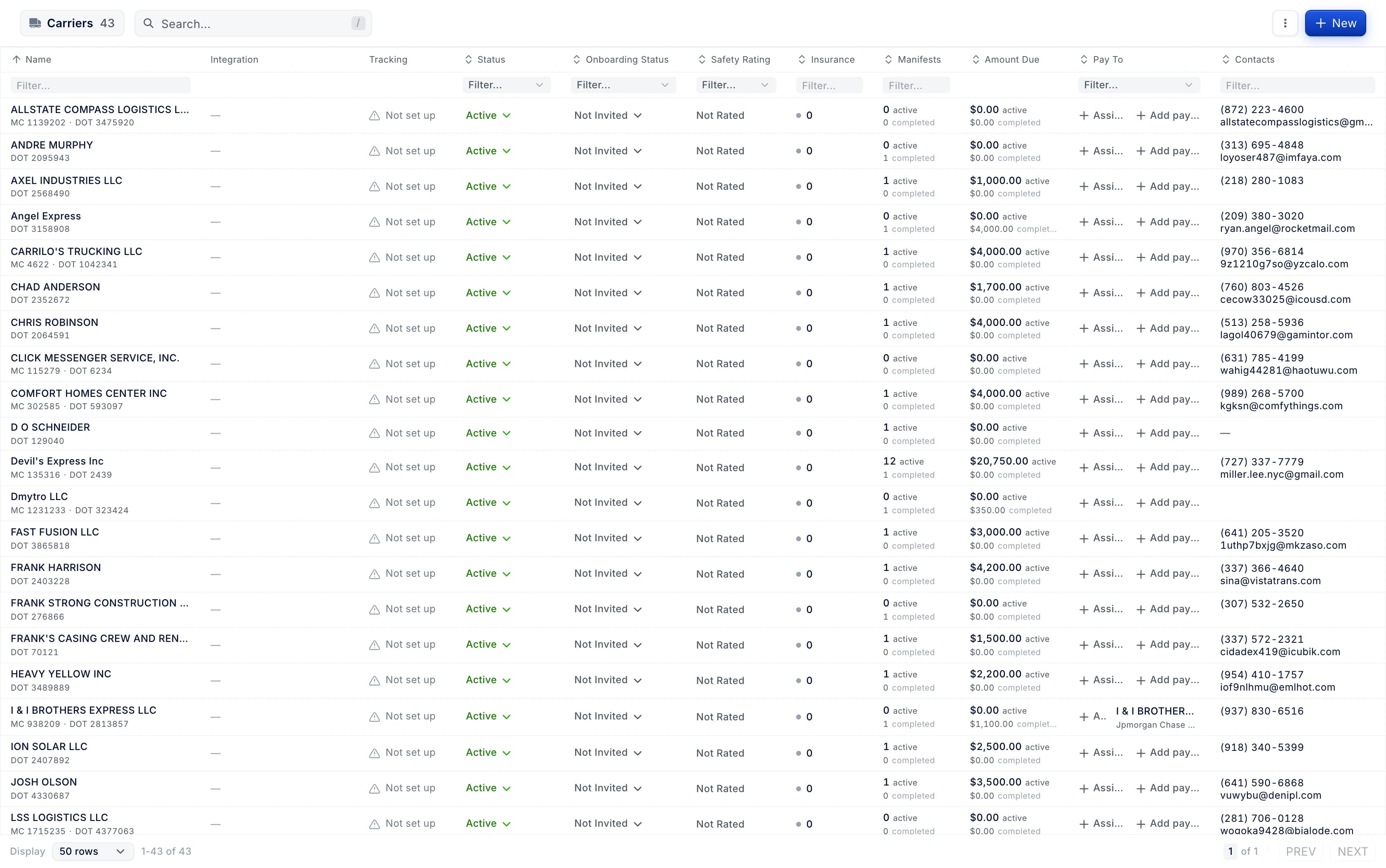
Carriers, rebuilt: who you can book, how they are paid and what you owe
The carriers list now puts each carrier's status, onboarding, safety, insurance, manifests, amount due and pay-to on one row, with a filter on every column. A carrier's page opens on an Overview, with its activity, payment and payee on the left.
Improvements 4
The Orders board can show a Teams column, so an open order can be put on a team's board before a driver is assigned.
- Why we changed it
- The column is available only when Team Association is on. Clicking a cell, or + Assign Team on an order without teams, opens the Manage Teams window.
Payee requests that are already decided open to show who decided them, when and why.
- Why we changed it
- Approving a new account warns when it takes a driver past your account limit. Approve or Reject on a request decided meanwhile shows its decision instead of an error.
Schedule blocks keep the origin and destination visible, and the arrival, departure and late text can be turned off in Schedule settings.
- Why we changed it
- The setting is Show Stop Status, under Manifest Card.
Sending an invoice can leave the invoicing company's documents out of that one invoice.
- Why we changed it
- Untick Send Documents under Attachments, and the preview and the email go without documents such as BOL and POD. The checkbox shows when the invoicing company has document types.
Fixes 11
Terminated drivers can be found again in driver filters on Orders, Reports and Transactions.
- Why we changed it
- Column filters such as Fuel Transactions, Fuel Card and Service Logs list them too. Pickers for assigning work still list active drivers only.
Driver pay totals on an order's Financials tab are no longer cut off on smaller screens.
- Why we changed it
- Long pay item names wrap onto a second line instead of pushing the table wider than the tab.
Closing or switching a PDF no longer interrupts text recognition that is already running.
Stop insights on the new order screen show network loading estimates with clear loading, no-history and retry states.
- Why we changed it
- An estimate appears only when enough history from other companies exists for the place.
The driver pay item window shows percentage pay items in % with the correct total.
- Why we changed it
- Before, it showed $ and rate × units, so 0.75 meant as 75% was saved as 0.75%.
A driver pay item can have a negative amount again, so deductions such as permits come off the driver's pay.
On a split, the hand-off drop keeps its ETA on the manifest page after live updates arrive.
Debits and credits can be added to vendor and company settlements again.